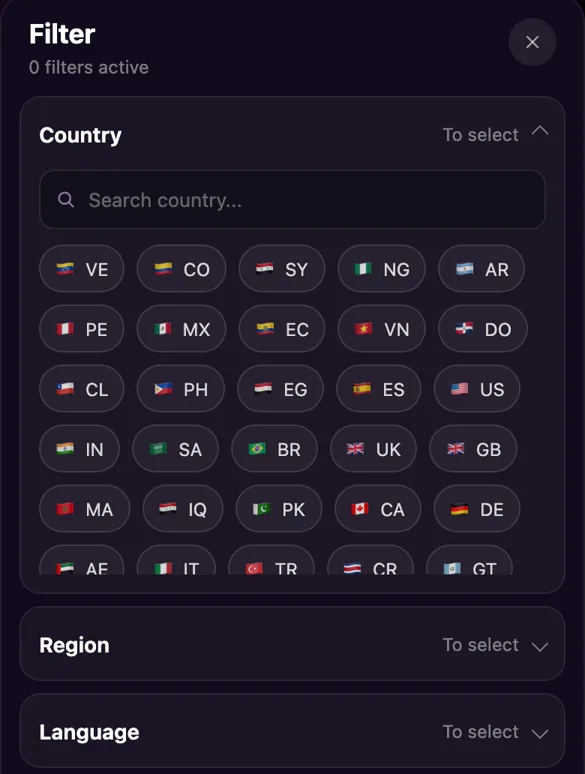
Short answer: you can't pick a country for a random match on OmegleWeb, because the system chooses who comes next. You can pick a country in the online list: open the filter, choose up to five countries, and every card you see is someone from there who you can call straight away.
Is there a country setting in the Match tab?
No. When you tap start in the Match tab, OmegleWeb's matching picks the next person, and there is no country, region or language option on that screen. That is the point of a random video chat: you don't know who is next until the video opens, and if the conversation isn't going anywhere, Next takes you to someone new.
So if you want to meet someone from a particular place, the random queue is the wrong tool. Keep it for the moments when you want a surprise, and use the online list when you already know who you are looking for.
How do I filter the online list by country?
The online list is the Discover tab. It shows people who are on OmegleWeb right now, in tabs such as Popular, Online and New. The filter sits at the end of that row of tabs.
- Open the Discover tab. It's the compass at the left of the bottom bar.
- Tap the filter icon (the sliders) at the right end of the tab row.
- Open Country. Type a name into the search box or tap the flags. You can choose up to five countries at once.
- Tap Confirm. The list reloads with people from the countries you chose, and the filter bar shows what is switched on.
To go back to everyone, open the filter again and tap Reset. The panel also keeps your recent filters at the top, so switching between two countries you like is one tap.
Country, region or language: which filter should I use?
The same panel has three sections, and they answer slightly different questions.
- Country The narrowest choice. Use it when you want to talk to someone from one place in particular, or a handful of places.
- Region A wider area made of many countries. Handy when a single country shows only a few people at the hour you are online.
- Language Often what you actually care about. If the goal is a conversation that flows, filtering by a language you share matters more than a flag. The tab row also has quick tabs for English, Spanish, Arabic, Vietnamese, Portuguese and French.
If a filter leaves the list nearly empty, that's usually the clock rather than the filter. People log on in their own evenings, so a country that looks quiet now can be busy a few hours later.
What does the flag on each card tell me?
Every card in the online list shows a flag and the country name above the person's name and age. A small label says Online, or Busy when they are already in a chat. The camera button on the card starts a video call with that person directly, and tapping the photo opens their profile first.
Calls you start from the list are paid with coins, and each person has their own price, which the app shows you. More about this side of the site is on the OmegleWeb girls page.
What if we don't speak the same language?
Picking a country often means picking someone whose first language isn't yours. OmegleWeb can translate the other person's text messages for you, both in your chat and in the message box during a video call. It is off by default; the first time you tap translate on a message, the app switches automatic translation on, and from then on their messages arrive translated.
Translation covers typed messages, so a mix works well: talk on camera with gestures and simple words, and type the sentence that matters. Most people enjoy helping with a few words of their language, so asking is a good way to start.
Ready to look? Open the online list, set the filter to the country you have in mind and call whoever catches your eye. Or leave it to chance in the Match tab.
Open the online listRead next: How an OmegleWeb video call works · All posts on the OmegleWeb blog